Manage your entire AFSS workflow without spreadsheets or manual follow-up. Merlo AI tracks Annual Fire Safety Statement obligations across your portfolio, coordinates with contractors, and handles the submission to the Local Council and Fire & Rescue Dept. all from inside Microsoft Teams and your Merlo AI Dashboard.
From Inspection to Submission
Every Step Managed
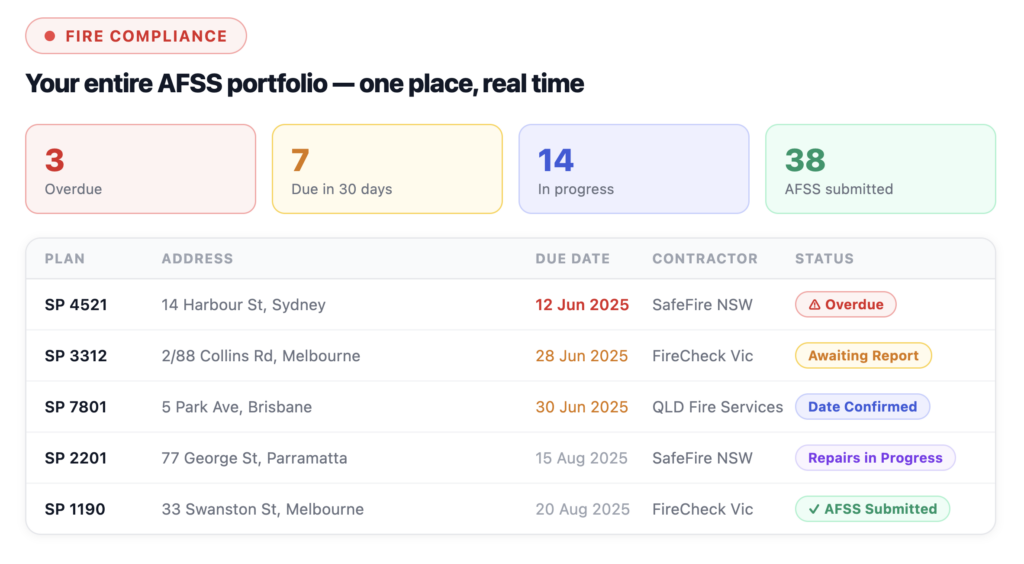
The AFSS process involves multiple parties, multiple deadlines, and multiple documents. Merlo AI gives you a single workflow that tracks every plan across your portfolio, automates the coordination, and flags issues before they become compliance failures.
STTEP 1
Import and track all compliance records
Add fire compliance records to the Merlo AI Dashboard individually or via CSV bulk import. Every strata plan’s AFSS due date, contractor, and status is tracked in one place.
STEP 2
Contractor assigned and notified
Assign a contractor to each inspection from the Dashboard. Merlo handles the outreach and tracks whether a response has been received.
STEP 3
Inspection date confirmed via Teams
When the contractor emails back with a confirmed date, drag and drop the email into the Merlo AI Teams chat. Merlo reads it, extracts the date and time, updates the record, and drafts the notification email for your review.
STEP 4
Inspection report uploaded
Once the inspection is done, drag and drop the report into the Teams chat. Merlo uploads it to SharePoint, links it to the compliance record, and updates the status automatically.
STEP 5
Repairs tracked if required
If the inspection identifies defects, Merlo tracks the repairs and reinspection process — confirming the reinspection date the same way as the original inspection.
STEP 6
Signed AFSS submitted to authorities
Drag and drop the signed AFSS document into the Teams chat. Merlo submits it to the Local Council and Fire & Rescue NSW via email, marks the record complete, and saves everything to SharePoint.
Built for Strata Portfolios, Not Spreadsheets
When you manage dozens or hundreds of strata plans, tracking AFSS manually across spreadsheets creates risk. Merlo AI gives you real-time visibility across your entire portfolio and automates the coordination that currently sits in your inbox.
Portfolio-Wide Dashboard
See every fire compliance record across your portfolio. Filter by status, due date, strata manager, or contractor – instantly.
Automated Status Tracking
Every action – confirmed dates, uploaded reports, submissions — updates the record status automatically. No manual updates required.
Deadline Alerts
Query the Teams Assistant for properties with AFSS due in the next 30 days. Never miss a deadline across your portfolio again.
Drag-and-Drop Simplicity
Confirmation emails, inspection reports, signed AFSS documents — just drop them into the Teams chat and Merlo handles the rest.
Documents Filed
Every document – reports, confirmations, signed statements – is uploaded to SharePoint and linked to the compliance record automatically.
Full Audit Trail
Every status change, document upload, and submission is logged with a timestamp. Your compliance history is always complete and accurate.